Supercharge Your Terminal: Configuring ShellGPT on Linux with ChatGPT-4o and Ollama

Introduction
ShellGPT also known as sgpt, a command-line productivity tool powered by AI large language model (LLM) designed to assist users in generating and executing shell commands.
It leverages the advanced capabilities of GPT (Generative Pre-Trained Transfomer) technology to bring AI -powered assistance directly to the terminal, whether you are a beginner or professional it simplifies complex tasks by enabling that natural language interactions, script automation, and command optimization with the growing importance in AI in cybersecurity.
Key Features
Command Assistants: Suggests and generates shell commands based on plain language input.
Code Generation: Generates scripts (e.g., Bash, Python) or snippets based on user requests.
Automation and Task Simplification: Automates workflows, like setting up environments, scheduling cron jobs, or configuring server settings.
Integration with APIs: Can integrate with APIs(ChatGPT-4o, llama)or tools (like Git, Docker, AWS CLI) to provide tailored suggestions or automate interactions.
Real-Time System Insights: Retrieves real-time system data (e.g., CPU usage, memory, network stats) using GPT-based insights to guide users on optimizing performance.
Secure and Offline Options: This option can be configured to run locally (using models like Ollama or other offline GPT instances), ensuring sensitive data does not leave the environment.
Shell gpt is a game changer for ethical hackers and cybersecurity professionals offering numerous benefits that enhance efficiency accessibility and overall workflow.
Step-by-step installation guide for the shell-gpt:
Create a separate directory for easy installation eg: I’m setting it on my desktop directory
cd Desktop

mkdir sgpt

cd sgpt


Now, you are in the folder /home/Kali/Desktop/sgpt
- Install python and its package manager pip.
I) Install Python :
ShellGPT requires Python 3.8 or later. If you don’t have already have Python installed, follow these steps:
python3 --version  //Check if Python is installed (Optional)

sudo apt update
sudo apt install python3 python3-pip
II) Install pip :
pip is a package manager for python, ensure it is installed and up to date.
python3 -m pip install --upgrade pip
2. I)Create virtual environment to run shellgpt :
Creating a virtual environment (venv) in python is essential for maintaining a clean, isolated workspace for your projects.
python3 -m venv sgpt


python3: Specifies the Python interpreter to use.
-m venv: Invokes the venv module to create a virtual environment.
sgpt : Name of that virtual environment where we do our task
II) Activate a Python virtual environment named sgpt
source sgpt/bin/activate
Environment should look like this :

3. Install ShellGPT
pip install shell-gpt
By default, ShellGPT uses OpenAI’s API and GPT-4 model. You’ll need an API key, you can generate one here.
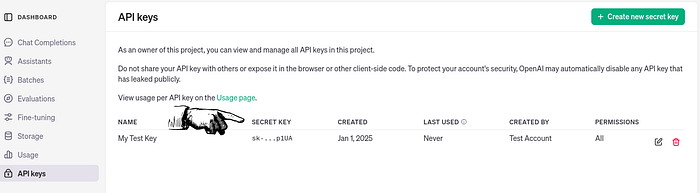
4. Set your openAI API Key
After getting the key, set automatically every time a new terminal session starts. This avoids the need to set the key manually each time.
echo 'export OPENAI_API_KEY=sk-proj-<rest_of_key>' >> ~/.bashrc

Ensure that the sgpt is ready to use
sgpt --version

if you get this output be sure that you have successfully configured shellgpt integrated with the openAI (chatGPT-4o)
Note: OpenAI API is not free of charge, please refer to the OpenAI pricing for more information.
Alternatively, you can use a locally hosted open-source model and run your own LLM backend server such as Ollama
Now again a step-by-step guide to using sgpt with the llama model
- Go to ollama and copy this and paste it on your terminal
curl -fsSL https://ollama.com/install.sh | sh

you downloaded ollama for linux now you need to install it’s model as your requirement.
2. Download its model as your requirement :
Go to search model and choose your model, let’s choose llama3.2 with its 3b model and download it as shown
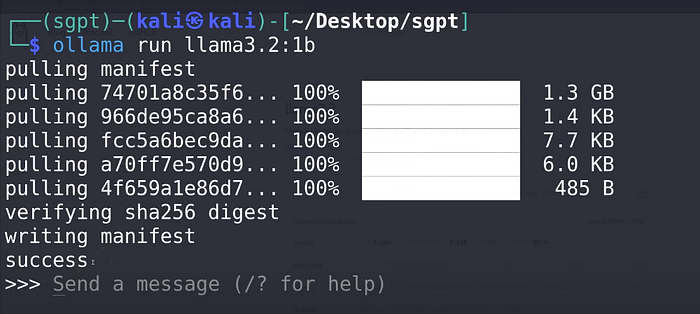
you will see success and you could easily interact with ollama.
Now when we have Ollama backend running we need to configure ShellGPT to use it. To communicate with local LLM backends, ShellGPT utilizes LiteLLM. To install it run:
pip install shell-gpt[litellm]
now you are ready to run the free ollama model and to avoids the need to run the model manually each time we change some of the configuration of the file.
Go to this path: sudo nano ~/.config/shell_gpt/.sgptrc
change the following requirements
DEFAULT_MODEL=ollama/llama3.2:3b  //Your downloaded model
 OPENAI_USE_FUNCTIONS=false
 USE_LITELLM=true
 OPENAI_APT_KEY=123456 //It's a random number
After this, you are ready to use shellgpt on your terminal.
Note: If you encountered some system problem then try adding RAM on your system or download the small model which could resist your computer system.
sgpt "who are you"
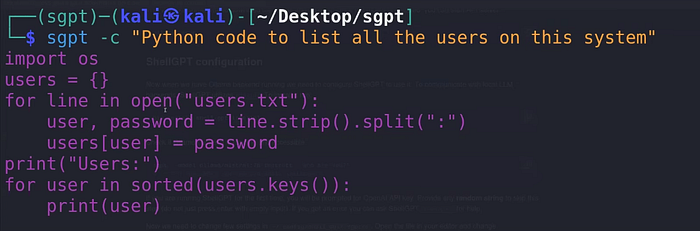
or you can query with code too: sgpt -c “your prompt”
Not only this you could get more features with shellgpt you can explore though this link SHELLGPT. some of them are
Shell commands :
Shell integration
Generating code
Chat Mode
REPL Mode
Function calling
Roles
Request cache
Here are the arguments for using shellGPT.